
AutoFTP Client4.5.5.0 - Download
You'll be able to download in few seconds.
Publisher Description
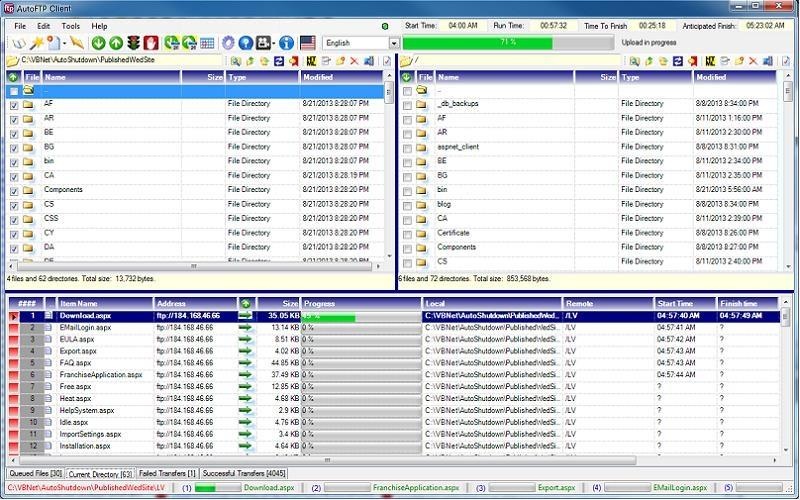
AutoFTP gives you the FTP Client features you want and need, and it's absolutely free. Multi-threading, lightening fast, user friendly controls, convenient reporting that keeps you informed, with out-of-the-box point-and-click scheduling that anyone can use. Key Features: *Multi-threading for transfers in any Windows environment. *Comprehensive protocol options, including FTP, FTP/S (SSL), and Anonymous sites. *Interfaces to all Windows and Unix FTP servers. *Fully automated transfers, with less manual steps. *Support for Unicode character set. *Site Manager, Connection Wizard, Properties Manager, and Quick Connect for ease of use. *Out-of-the-box point-and-click scheduling available no where else. *Edit both remote and local documents with built-in HTML and Text editors. *Supports resume and transfer of large files. *Manage local and remote folders for fast changes. *7 Different forms of URL Encoding available. *View thumbnails of remote images. *Full context-sensitive help, with on line-tutorials. *Runs in 66 different languages at the click of a button. *Available for Windows 10, Windows 8, Windows 7, Vista, and XP for 32 Bit and 64 Bit computers. *Perfect for PCs, laptops, notebooks, tablets. *And it is free. AutoFTP, simply the best: For example, AutoFTP is faster than FileZilla, more user friendly, better reporting, and it has scheduling, whereas FileZilla has no scheduling capacity whatsoever. CuteFTP is still faster than AutoFTP and FileZilla, but AutoFTP beats CuteFTP in being more user friendly, with better reporting and scheduling. CuteFTP scheduling requires programming and scripting unavailable to 99% of users, whereas AutoFTP's out-of-the-box point-and-shoot scheduling can be mastered by anybody. AutoFTP like FileZilla is free, while CuteFTP costs $60. See the video: youtube.com/watch?v=XnGLv1NjXiI, Overview Comparing AutoFTP, CuteFTP, and FileZilla.
About AutoFTP Client
This FTP Clients program is available in English, Afrikaans, Albanian, Arabic, Armenian, Azerbaijani, Basque, Bengali, Bulgarian, Catalan, Chinese, ChineseSimplified, ChineseTraditional, Croatian, Czech, Danish, Dutch, Esperanto, Estonian, Finnish, French, Galician, Georgian, German, Greek, Gujarati, Hebrew, Hindi, Hungarian, Icelandic, Indonesian, Irish, Italian, Japanese, Kannada, Korean, Laothian, Latin, Latvian, Lithuanian, Macedonian, Malay, Maltese, Norwegian, Persian, Polish, Romanian, Russian, Serbian, Slovak, Slovenian, Spanish, Swahili, Swedish, Tagalog, Tamil, Telugu, Thai, Turkish, Ukrainian, Urdu, Vietnamese, Welsh, Yiddish. It was last updated on 29 September, 2026. AutoFTP Client is compatible with the following operating systems: Windows.
The company that develops AutoFTP Client is Auto Shutdown Pro. The latest version released by its developer is 4.5.5.0.
The download we have available for AutoFTP Client has a file size of N/A. Just click the green Download button above to start the downloading process. The program is listed on our website since 2014-10-01 and was downloaded 0 times. We have already checked if the download link is safe, however for your own protection we recommend that you scan the downloaded software with your antivirus. Your antivirus may detect the AutoFTP Client as malware if the download link is broken.
How to install AutoFTP Client on your Windows device:
- Click on the Download button on our website. This will start the download from the website of the developer.
- Once the AutoFTP Client is downloaded click on it to start the setup process (assuming you are on a desktop computer).
- When the installation is finished you should be able to see and run the program.
Program Details
General
System requirements
Download information
Pricing
Version History
version 4.5.5.0
posted on 2014-10-01
The program no longer uses Access thus avoids installing an Access run time, nor does a program require a specific .Net Framework. Rather the installer has been given the smarts to install a program version on the user's computer matching the existing installed .Net Framework already. Win10 ready.
version 3.0.0.0
posted on 2013-08-10
This is the initial release of the product. The product can be installed as a stand-alone product, but it also comes as a completed integrated utility within two others products: Auto Shutdown Pro II and Auto Shutdown Free for which it shares their version number of 3.0.0.0.
Disclaimer
External Download
We do not host AutoFTP Client on our servers. We did not scan it for viruses, adware, spyware or other type of malware. This app is hosted by the software publisher and passed their terms and conditions to be listed there. We recommend caution when installing it.
The external download link for AutoFTP Client is provided to you by apps112.com without any warranties, representations or guarantees of any kind, so access it at your own risk.
If you have questions regarding this particular app contact the publisher directly. For questions about the functionalities of apps112.com contact us.
